Before and after gallery SEO makes appropriately authorized case images easier to discover, understand, and navigate. It should improve access to useful evidence without stripping away clinical context or exposing information the practice is not entitled to publish.
A gallery has two jobs. It helps a prospective patient evaluate the work a practice chooses to present, and it gives search engines a technically accessible set of pages and images. A system that performs only the second job can create a visible but misleading gallery. A system that performs only the first may hide useful content behind inaccessible filters or scripts.
This is a marketing and publishing guide, not legal advice. The practice's qualified advisers should approve patient-media authorization and clinical presentation.
Before and after gallery SEO begins with permission and purpose
Confirm that each asset is approved for the intended public use. Permission to take a clinical photograph is not something a marketing team should assume is permission to publish it on a website, social platform, or advertisement. The exact authorization and applicable rules require case-specific review.
Keep a controlled record of the asset, authorization status, allowed uses, responsible reviewer, and any restrictions. Do not place identifiable patient details in a general SEO spreadsheet simply because it is convenient. The marketing workflow should receive only the information needed for the approved publication.
Decide what the gallery is meant to communicate. It can show selected examples with appropriate context; it cannot establish that every visitor will achieve a similar result. Avoid selection, captions, or editing that imply a promise the practice cannot support.
The HHS marketing guidance is one official starting point for privacy review, not a substitute for advice about a particular image workflow.
Practical check. If the team cannot identify who approved an image for the specific channel, do not treat its presence in a shared folder as publication permission.
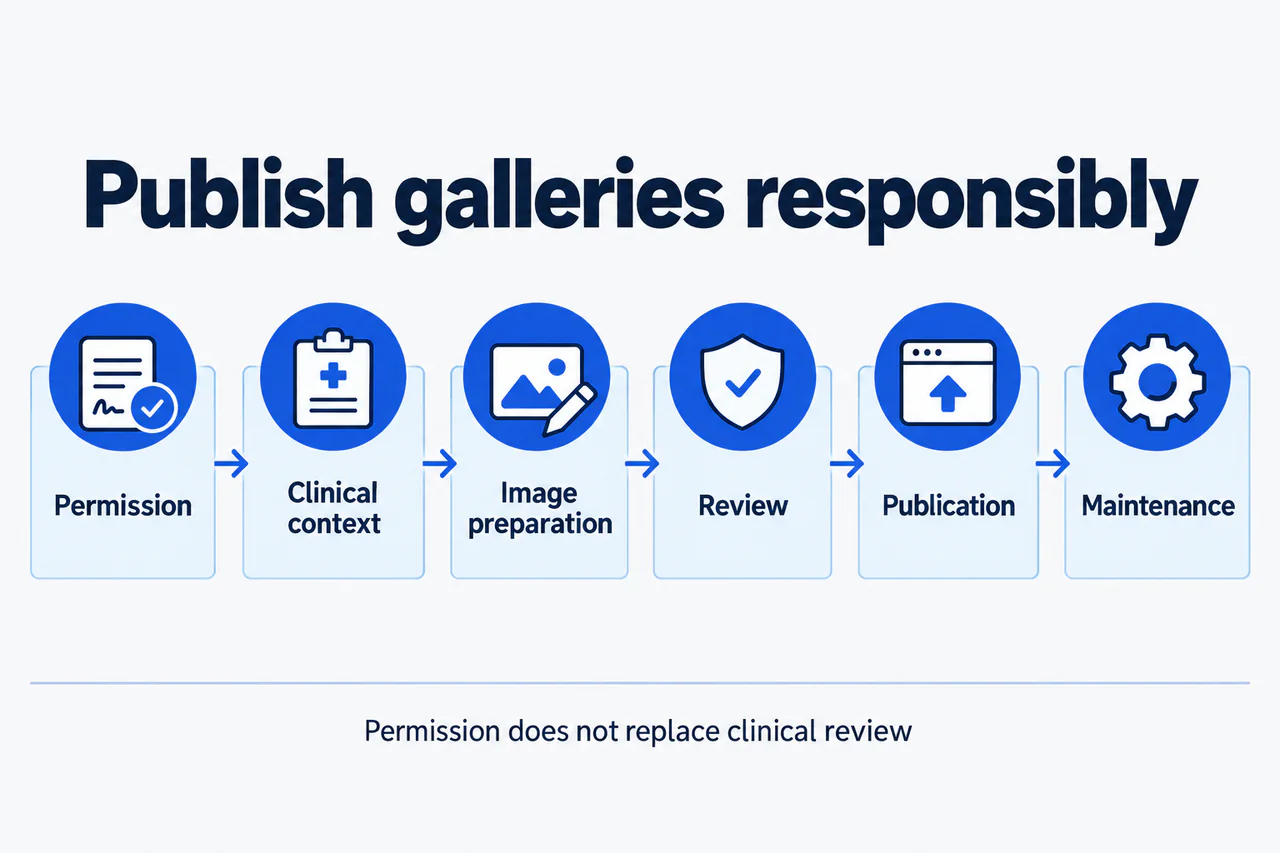
Illustrative publishing workflow. Permission and clinical context come before web preparation and review. Publication is followed by ongoing maintenance, not the end of responsibility.
View full-size diagram (opens in a new tab)Organize galleries around useful browsing decisions
Group cases in ways that help visitors understand the practice's services. Procedure categories are often a practical starting point. Add filters only when the information is appropriate, accurately maintained, and useful to the audience.
Do not generate thousands of thin URLs from every filter combination. A filter can be valuable for browsing without needing a separately indexed landing page. Decide which gallery categories or case pages have enough purpose and context to stand on their own.
A case page should not consist solely of two images and a repeated paragraph. Where appropriate and approved, explain the procedure category, the relevant clinician, the timing context, and meaningful limitations of the comparison. Avoid publishing unnecessary identifiers or clinical details.
Connect the gallery to the relevant procedure page and surgeon biography. The visitor should be able to move from an example to the service explanation and then to an informed consultation route. Our SEO foundation guide explains why these relationships matter more than isolated image pages.
Practical check. Open a case directly without first visiting the gallery homepage. Can a new visitor understand what they are seeing and where to go next?
Make important images technically discoverable
Use image elements and a loading approach that search engines can discover. Google's image SEO guidance explains the importance of image URLs, page context, and descriptive information. A photograph used only as a CSS background is not equivalent to a normal content image for discovery.
Check lazy loading carefully. Images that appear only after a user clicks a button or completes a complex interaction may not be discovered as intended. The developer should test the rendered page and ensure important gallery content does not depend entirely on interactions a crawler will not perform.
Use appropriately sized files and responsive images so that the gallery works on mobile devices. Preserve sufficient detail for the page's purpose without forcing every visitor to download the largest original file. Image dimensions and loading behavior should reduce avoidable layout movement.
If the gallery uses a separate image host or content delivery network, confirm that image URLs remain accessible and that changes to the host are included in migration planning. A website redesign can preserve page URLs while accidentally breaking image URLs.
Practical check. Ask the developer to demonstrate that one case's primary images are discoverable without manually operating every gallery control.
Write alt text and captions for different jobs
Alt text describes an image's function or relevant content for people who cannot see it. A caption supplies visible context for everyone. They can overlap, but they are not interchangeable fields for inserting keywords.
Write concise, factual descriptions that do not expose unnecessary personal information or make unsupported outcome claims. Avoid naming a patient in a filename, alt attribute, or caption unless that specific disclosure has been appropriately reviewed and authorized. Search visibility is not a reason to publish more identifying detail.
For a paired comparison, the surrounding page should make the sequence and context understandable. If an interactive slider is used, check whether keyboard and assistive-technology users can access the same information. A plain side-by-side alternative may be more useful than a visually impressive but inaccessible control.
Do not write “best result” or “perfect outcome” as though alt text were advertising space. Descriptions should reflect the image, and important limitations should appear visibly in the page content rather than being hidden in an attribute.
Practical check. Read the case page without looking at the images. Then inspect it with images visible. Both experiences should communicate the same essential context without relying on promotional assumptions.
Protect the meaning of the comparison
Consistent presentation helps visitors interpret images, but marketing staff should not make clinical judgments about what a comparison demonstrates. The practice should establish a reviewed protocol for lighting, positioning, timing labels, cropping, and any permitted edits.
Do not alter anatomy or use generative tools to improve a patient result. AI-generated before-and-after examples are not evidence of the surgeon's work. If an educational illustration is useful, label it clearly and keep it separate from real case photography.
Avoid implying that a selected case is typical without an appropriate basis. Individual results vary, but a generic disclaimer should not be used to excuse a misleading selection or caption. The overall impression of the page matters.
This review should be part of the content and implementation process, not a last-minute task left to whoever uploads the files. The practice's clinical and privacy reviewers may need different information and separate approval steps.
Practical check. Ask what a reasonable visitor might infer from the image pair before reading the disclaimer. If that inference is inaccurate, change the presentation itself.
Maintain the gallery as an operational asset
Create a process for updates, corrections, rights questions, and removal requests. A gallery that is accurate at launch can become inaccurate when clinicians leave, procedures change, or an asset's publication status needs review.
Track where an image is used: case page, procedure page, article, social post, or advertising campaign. If an image must be removed, deleting one page may not remove every copy or cached search result. Have the appropriate team assess the necessary actions rather than promising immediate disappearance from the entire internet.
Measure the gallery's contribution carefully. Gallery views can indicate interest, but they do not prove clinical suitability or a completed consultation. Use aggregate, privacy-approved measurement and avoid sending case-specific patient data into general marketing tools.
Practical check. Choose one asset and trace every approved public use. If the team cannot find its copies, improve the asset register before expanding the gallery.
Frequently asked questions
Does every case need its own page?
No. A separate page should provide useful context and a coherent browsing purpose. Thin pages created only to increase URL count can make the site harder to maintain without improving the experience.
Can we put the procedure and city in every filename?
Use descriptive filenames where practical, but do not turn them into repetitive keyword strings. Never include unnecessary patient identifiers. The surrounding page, image accessibility, and accurate context are more important than a filename formula.
Will adding schema make gallery images rank?
Structured data can describe supported, visible information but does not guarantee image rankings or enhanced presentation. Do not invent ratings, case outcomes, or medical claims to fill schema fields.
Can we use a former practice's photographs?
Do not assume that the surgeon's involvement gives the new practice publication rights. Ownership, patient authorization, and contractual permissions need review. Use only assets the practice is entitled to publish in the intended context.
What if we do not yet have authorized images?
Publish accurate service information and build the authorization workflow first. Educational diagrams may be useful if clearly labelled, but they should never be presented as patient results. An empty evidence claim is worse than an honest limitation.
Audit the system before adding more cases
A useful gallery needs permission, context, accessibility, and maintenance. Review those four areas together. You can explore the guide library for related content decisions or request a gallery SEO assessment to identify technical and navigational issues before expanding publication.