Switching SEO agencies should begin with asset ownership and a documented handover, not with immediate password changes or a website rebuild. The practice needs to preserve its public contact routes, useful content, historical data, and ability to operate while responsibilities change.
A vendor transition does not automatically require a new domain, new website platform, or new business profiles. Each of those is a separate change with its own risks. Keep the transition as simple as the circumstances allow, and review contractual obligations before making commitments.
Switching SEO agencies starts with an asset inventory
List the systems and assets the current provider manages. Include domain registration, DNS, hosting, CMS, Search Console, analytics, business profiles, advertising accounts, forms, appointment tools, call-tracking numbers, email integrations, content, images, and relevant licenses.
For each item, record the owner, administrator, billing party, recovery route, and transfer requirement. “We have a login” is not enough if the agency controls the only owner account or the service is licensed under a nontransferable subscription.
| Asset | Critical question | Handover evidence |
|---|---|---|
| Domain and DNS | Can the practice control renewal and records? | Verified owner access and documented configuration |
| Website and hosting | Can the practice operate and restore the site? | Working access and tested backup plan |
| Profiles and search accounts | Does the practice retain appropriate ownership? | Confirmed permissions and property inventory |
| Forms and phone routes | Will inquiries still reach the practice? | Successful synthetic tests |
| Content and licenses | What can be transferred or reused? | Written rights and subscription record |
Practical check. Mark unknown ownership as an unresolved issue, not an assumption. Resolve critical unknowns before setting the final cutover date.
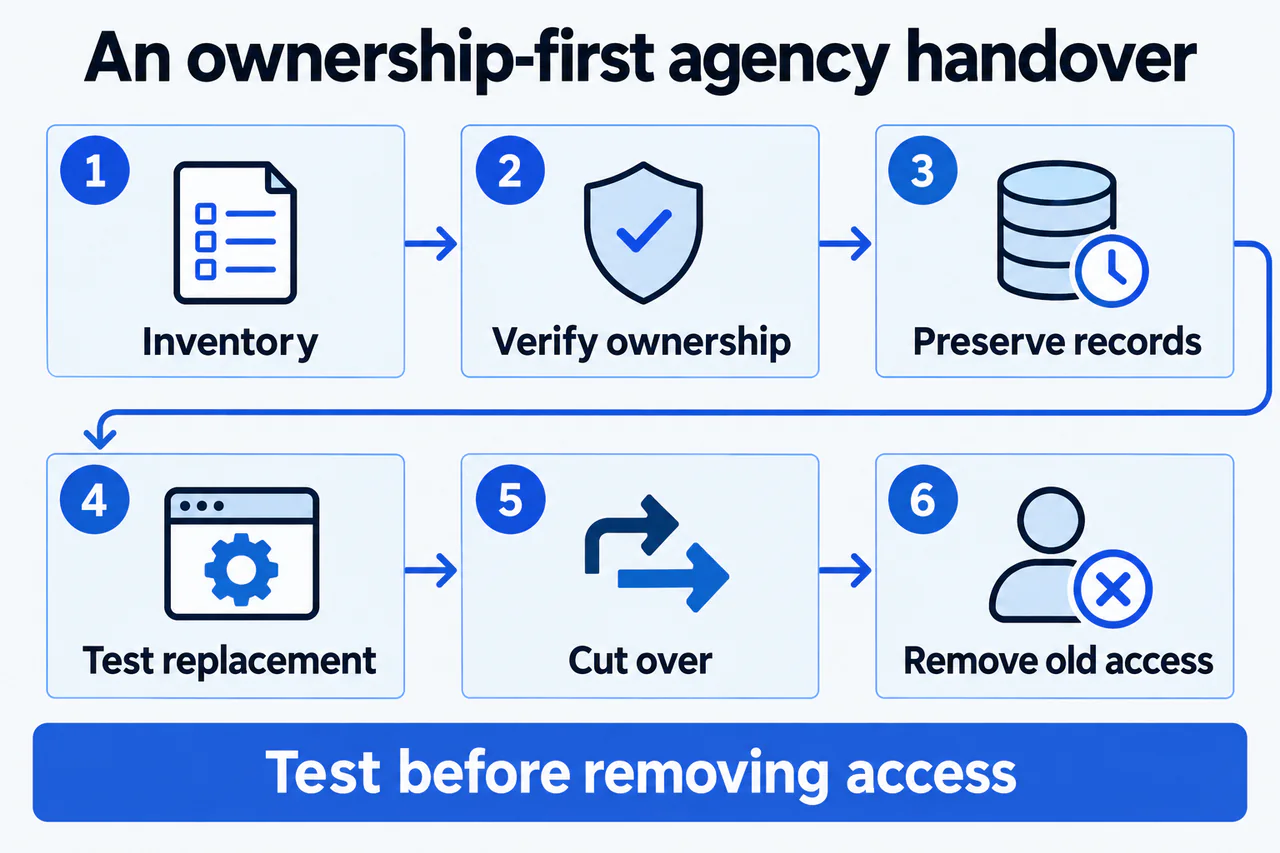
Illustrative handover sequence. Inventory assets, verify ownership, preserve records, and test the replacement before cutting over and removing old access.
View full-size diagram (opens in a new tab)Step 1 Review the agreement and define the handover
Read notice requirements, termination dates, asset ownership, export provisions, outstanding fees, and license limitations. Obtain legal advice where the contract is unclear. Do not assume that changing agencies authorizes copying assets the practice does not own.
Send a clear handover request identifying the assets, desired exports, responsible contacts, and proposed schedule. Keep the communication professional and specific. The objective is continuity, not proving which agency was right about every past decision.
Choose a practice-side decision owner and a technical coordinator. They should know which changes require approval and how urgent issues will be escalated. Avoid several vendors independently modifying DNS, tracking, or forms during the transition.
Practical check. Agree on what “handover complete” means before the outgoing provider's access ends.
Step 2 Verify ownership and recovery access
Confirm the practice's control of the domain and essential accounts. Use permission-based invitations and secure credential handling rather than putting passwords into a shared spreadsheet or email chain.
For business profiles, follow the current ownership-transfer process. Google's primary-ownership guidance explains the relevant operation and restrictions. A profile should not be recreated simply because an agency relationship ends.
Review recovery email addresses, multifactor authentication, and emergency contacts. Ensure the practice can recover accounts without relying on a former employee or vendor. Do not remove the only working administrator before another authorized owner has been verified.
Practical check. Have the practice owner or authorized administrator sign in independently and confirm the permissions, rather than accepting a screenshot of someone else's access.
Step 3 Preserve history and the current configuration
Export available reports, task logs, content inventories, redirect maps, and relevant configuration records. Preserve the definitions behind the numbers, not just a PDF dashboard. A new agency needs to know whether a reported conversion meant a phone click, form event, or unique inquiry.
Create an appropriate website backup and verify the restoration plan. A file labelled “backup” is not proof that the site can be restored. The technical team should understand what is included, what is external, and where licensed or hosted components may be missing.
Record important URLs and their current behavior. Include high-value pages, galleries, forms, and campaign destinations. If a later change breaks a journey, this baseline helps identify what changed.
Keep patient information within approved systems and export only what is necessary and authorized. A marketing handover should not become an uncontrolled transfer of clinical records.
Practical check. Ask the incoming provider to identify which records are essential for continuity and which data it does not need.
Step 4 Test replacement services before cutover
If hosting, forms, analytics, or call tracking will change, test the replacement in an appropriate environment before switching. Use synthetic submissions and verify the full route to the practice's responsible staff member.
Phone numbers deserve special attention. Determine whether numbers are owned, leased, portable, or tied to a vendor account. A visible number that stops forwarding can interrupt inquiries even when the website appears unchanged.
Avoid unnecessary URL changes. If a migration is genuinely required, create a separate plan with relevant redirects, canonical checks, sitemap updates, and postlaunch monitoring. Google's site-move guidance is a technical reference, not a guarantee of zero fluctuation.
The SurgeonSEO process should distinguish an agency handover from a full migration project so the practice can understand the scope and risk.
Practical check. Test the highest-value patient journeys on a phone as well as a desktop before approving the switch.
Step 5 Cut over with a clear change window
Schedule the transition when the responsible people are available to verify it. Document which settings will change, who will make each change, and what condition would trigger a rollback or escalation.
After the switch, confirm website availability, SSL behavior, forms, appointment links, phone routing, email delivery, profile destinations, and critical tracking behavior. Check that production indexing settings remain correct if a staging site was involved.
Do not interpret the first few hours of incomplete analytics as an immediate SEO failure. First establish whether the systems are functioning and the data is being collected as intended. Keep operational testing separate from later search-performance assessment.
Practical check. Require a written acceptance record with actual test results, not a message saying “everything looks good.”
Step 6 Remove obsolete access and review the first cycle
Once the practice has verified continuity and contractual handover obligations are satisfied, remove permissions the outgoing provider no longer needs. Review users, integrations, API keys, shared folders, and billing arrangements through the appropriate administrators.
Do not delete historical properties or data merely to make the new dashboard look clean. Preserve useful continuity where permitted. Document any measurement changes so later reports do not confuse a new configuration with new performance.
During the first review cycle, compare the live site with the baseline and investigate broken routes, missing content, or unexpected indexing changes. The practice-owner SEO guide provides the broader context for monitoring the assets that matter.
Practical check. Ask the incoming provider to produce a short “inherited, changed, unresolved” summary. This establishes an honest starting point for the new relationship.
Frequently asked questions
Will changing agencies automatically hurt rankings?
The agency's name is not the technical change. Risk comes from what is altered, such as URLs, content, hosting behavior, or indexing settings. Preserve stable assets where appropriate and plan necessary changes carefully.
Should we change the domain during the handover?
Only for a separate, well-supported business reason. Combining a vendor transition with a domain migration increases the number of variables. Treat a necessary move as its own project.
Can the outgoing agency keep our content?
The answer depends on ownership and licensing terms. Review the contract and obtain qualified advice if needed. Do not assume either party's rights from who originally uploaded the material.
Should we revoke access immediately?
Protect the practice promptly where there is a security concern, using qualified support. In an ordinary handover, verify replacement ownership and operational continuity before removing necessary access. Avoid locking the practice out of its own systems.
What should the new agency receive first?
Start with the asset inventory, approved access, priorities, implementation history, and measurement definitions. Share only necessary data through appropriate channels. Raw patient records are not a normal SEO onboarding requirement.
Change providers without changing everything
An orderly handover preserves what works and makes responsibility clearer. Review the local-profile service context if listings are involved, or request a transition audit before the cutover. The useful outcome is continuity and control, not a dramatic reset for its own sake.